Scholarle
A Google Scholar query builder. Compose structured boolean queries using a visual block interface — choose a field, enter a term, set an operator, toggle exact match — and Scholarle's Query Translation Module assembles the precise Google Scholar URL, including journal ISSN filtering, year range, and parenthetical operator grouping. One click opens the results directly in Google Scholar.
Project Overview
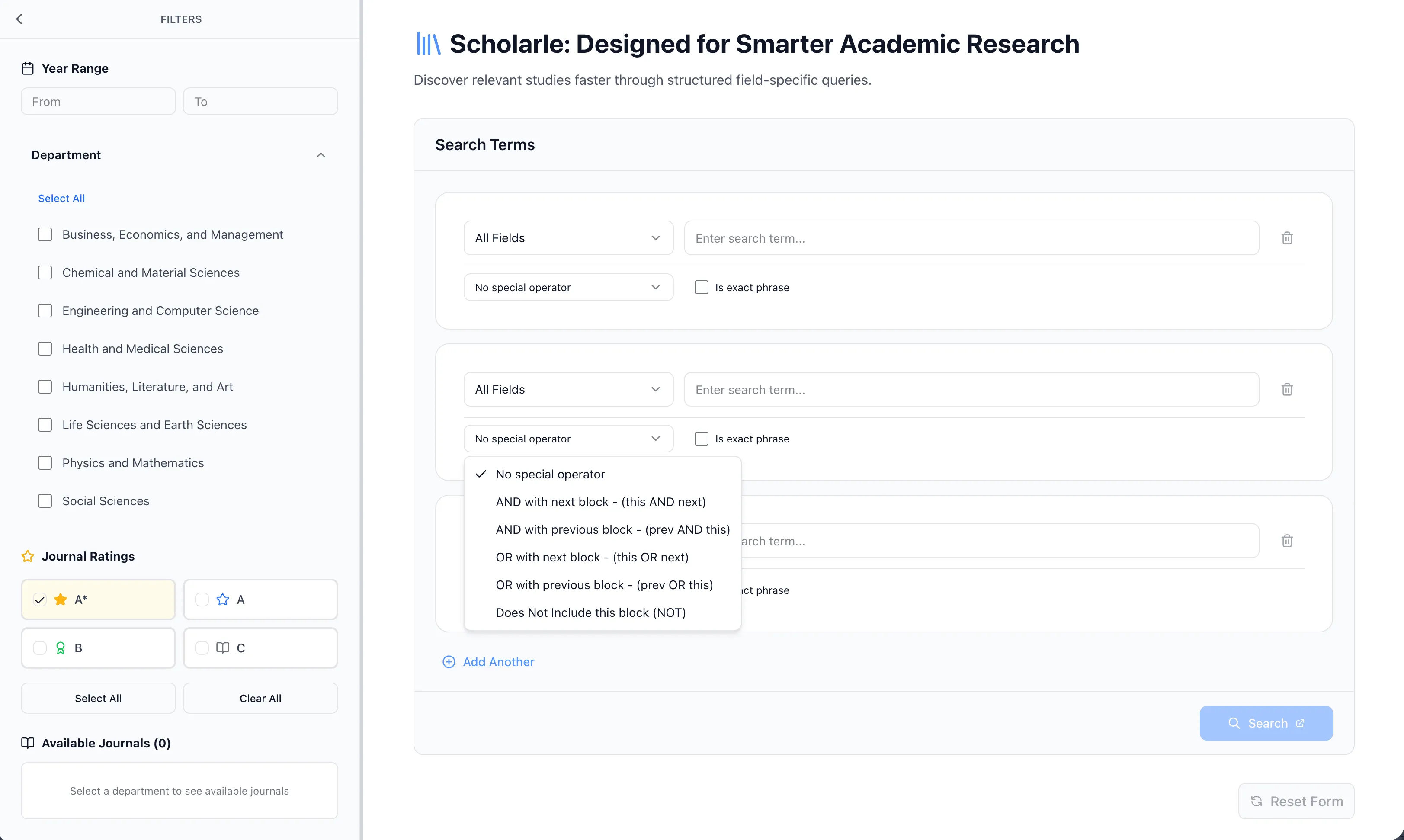
Scholarle is a Google Scholar query builder. It doesn't have its own search index — it constructs the Google Scholar URL for you and opens the results in a new tab. The value is entirely in the query construction: Google Scholar supports a rich set of URL parameters and field operators that its own interface doesn't fully expose, and Scholarle gives researchers a structured way to use all of them.
The interface is block-based. Each query block represents one search condition — a field, a term, a boolean operator, and an optional exact-match toggle. Blocks chain together into groups that become parenthetical expressions in the final query. A sidebar handles the filters that sit outside the main query: year range, journal selection by ISSN, journal rating, and field of research.
The translation from UI state to Google Scholar URL is handled
by a dedicated Query Translation Module (QTM) in
lib/qtm.ts. It validates
blocks, synthesises field operators, resolves operator chains
into parenthetical groups, appends ISSN expressions, and builds
the final URL — warning if it exceeds Google Scholar's
2048-character limit.
Active Search Fields
Each block targets one of the following fields, which map directly to Google Scholar URL operators:
-
all_fields— searches across all fields, no explicit GS operator added -
article_title→ generatesintitle: -
author→ generatesauthor: -
abstract→ generatesintext: -
site_search→ generatessite: -
filetype_search→ generatesfiletype:
Tech Stack
- Next.js 15 (App Router) with Turbopack for dev and build
- TypeScript throughout — query blocks, journal types, QTM input/output, all typed
- React 19 + Tailwind CSS for UI
- Radix UI for accessible UI primitives (dropdowns, toggles, collapsibles)
- Vercel Analytics for usage tracking
-
CSV-backed journal dataset in
public/data/journals.csv, loaded and parsed at runtime vialib/journalLoader.ts
The Problem
Google Scholar's search interface is not as powerful as Google
Scholar's actual search engine. The platform supports a
substantial set of URL-level operators and parameters —
intitle:,
author:,
intext:, boolean
AND /
OR, exclusion with
-, parenthetical grouping,
ISSN-based journal targeting, year range — but the web UI
exposes almost none of this.
The "Advanced search" form Google Scholar provides covers basic cases: all words, exact phrase, any of the words, none of the words, date range, and a single author field. There is no way through the UI to:
- combine multiple author or title conditions with explicit boolean logic
- chain OR conditions between fields of different types
- target a specific journal by ISSN rather than by name string (which is fragile)
- scope abstract-level and title-level conditions simultaneously in the same query
-
build parenthetical sub-expressions like
(term1 OR term2) AND author:smith
Researchers who know these operators exist still have to construct query strings by hand, remember the exact operator syntax, handle URL encoding themselves, and hope the string stays under 2048 characters. Most don't — they do simple keyword searches and manually filter through far more results than necessary.
Block-Based Query Composition
The main interface is a list of query blocks. Each block has four properties:
- Field — which part of a paper to search: all fields, title, author, abstract, site, or filetype
- Search term — the text to match against that field
-
Operator — how this block relates to the
next or previous one:
NONE,AND_NEXT,AND_PREV,OR_NEXT,OR_PREV,EXCLUDE - Exact phrase — toggles whether the term is wrapped in quotes in the generated query
Blocks that share a forward/backward operator pair
(AND_NEXT on one block,
AND_PREV on the next) are
automatically grouped into parenthetical expressions by the QTM.
This is how compound conditions like
(intitle:neural AND intext:training)
are produced without the user needing to think about grouping
logic manually.
Query Translation Module (QTM)
The QTM in lib/qtm.ts is
the core of the application. It takes the array of query blocks
and the sidebar filter state and produces a complete, valid
Google Scholar URL.
Its responsibilities in order:
- Validate and clean — strip empty or invalid blocks before processing
-
Synthesise each block — apply the field
operator prefix, wrap in quotes if exact match is enabled,
prepend
-for exclusions - Resolve operator chains — detect forward/backward operator pairs and group the linked blocks inside parentheses
- Append ISSN expressions — for each selected journal ISSN, append the corresponding Google Scholar ISSN parameter to the query
-
Build the final URL — assemble the base URL
(
https://scholar.google.com/scholar?), mandatory parameters (hl=en,as_sdt=0%2C5), the encoded query string, and any active sidebar filters (year range asas_ylo/as_yhi) - Warn on length — flag if the generated URL exceeds 2048 characters, which is the effective limit for reliable Google Scholar behaviour
Journal Filtering
The sidebar includes a journal selector backed by a CSV dataset
at public/data/journals.csv,
parsed at runtime by
lib/journalLoader.ts.
Journals in the dataset carry a rating
(A*,
A,
B,
C) and one or more
field-of-research codes.
The researcher filters the journal list by field of research and minimum rating to narrow it to relevant options, then selects specific journals by ISSN. Selected ISSNs are appended to the query string by the QTM, scoping results to those publications precisely — more reliable than matching on journal name, which can have abbreviation variants.
Sidebar and Layout
The layout is a left sidebar alongside the main query builder area. The sidebar holds all filters that are independent of the main query blocks: year range, journal selector, journal rating filter, and field-of-research filter for narrowing the journal list.
The sidebar is resizable on desktop (width persisted in
localStorage), collapsible,
and mobile-aware — it adapts to narrower viewports without
breaking the query builder layout.
Outcomes
- Scholarle is live at scholarle.com.
- The QTM correctly handles the full range of Google Scholar URL parameters: field operators, boolean chains, parenthetical grouping, ISSN expressions, year range, and URL encoding — all produced without the researcher touching a query string.
- Journal filtering by ISSN is more precise than name-matching and doesn't break when a journal's displayed name has abbreviation variants.
- The repository is private.
Key Learnings
-
Operator chain resolution is the hardest UI problem:
Deciding when two adjacent blocks should be grouped in
parentheses versus joined at the top level isn't obvious from
a UI that shows blocks as a flat list. The
forward/backward operator pair approach
(
AND_NEXT/AND_PREV) gives users explicit control over grouping without exposing them to parenthesis syntax directly. - URL length is a real constraint: Google Scholar's 2048-character URL limit becomes a genuine problem when combining many blocks with multiple ISSN selections. Building the warning into the QTM rather than letting the query silently truncate was the right call.
- ISSN filtering is more robust than name matching: Academic journals have many name variants, abbreviations, and historical name changes. Targeting by ISSN sidesteps all of that — the same identifier works regardless of how the journal name appears in the URL.
- The CSV journal dataset needs ongoing maintenance: Journal ratings and field-of-research assignments change over time. The dataset is a static file at build time, which means ratings can go stale. An updatable or externally sourced dataset would be more durable long-term.